

Tape measure, spirit level, protractor and ruler — and you pay only once
Measure length, several segments in a row, and area with the camera. Enter a wall height and get the room volume, or produce a floor plan with the dimensions on every wall. No subscription, no account, and nothing leaves your phone.

Price
Free
Category
Utilities
Platforms
iPhone
Features
Everything Mitta can do
Measure With the Camera
Length, several segments in a row, and area. Enter the wall height and you get the room volume — the figure needed for heating, paint and moving quotes.
Floor Plan and Room Scan
A floor plan with the dimensions written on every wall. On devices with LiDAR, a full room scan picks up walls, doors and windows.
Spirit Level
For surfaces and edges — the shelf, the picture frame, the washing machine that has been rocking for a year.
Protractor and Ruler
An angle and inclination meter, plus a screen ruler calibrated against a payment card, so short measurements do not need any setup at all.
Projects and Export
Collect measurements into named projects, export as PDF or CSV, and share the floor plan as an image.
Pay Once
No subscription and no account. No data leaves your phone — which for photographs of the inside of your home is worth more than it sounds.
Screenshots
A look inside Mitta
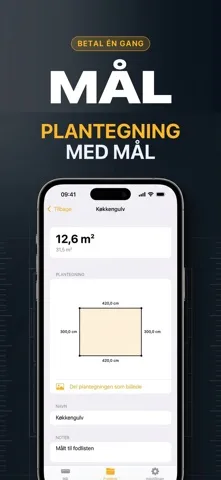
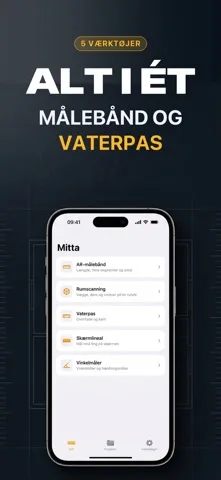
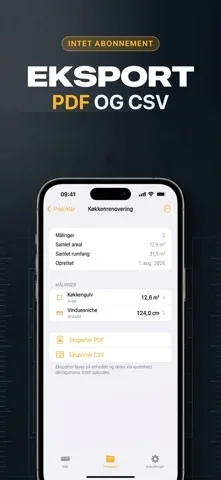
How it works
Up and running in 4 steps
Point and measure
Length, multi-segment runs or area — the app shows how reliable the current measurement is.
Add the wall height
Enter it once and the room volume follows from the floor area.
Build the floor plan
Each wall is labelled with its dimension; on LiDAR devices a full scan picks up doors and windows.
Export it
PDF or CSV for the file, or the floor plan as an image to send on.
Mitta Pro
One-time purchase
- Unlimited measurements and projects
- Floor plan and room volume
- PDF and CSV export
- No subscription and no account
Guides
Go deeper with Mitta
In-depth answers to what people actually search for — and how Mitta solves it.
FAQ
Questions, answered
How accurate is measuring with the camera?
Without a LiDAR scanner, expect 1–5% deviation. The app shows how reliable the current measurement is and warns you when you are too far away or the light is poor. Check with a tape measure for anything that must be exact.
Learn moreWhat do I get without LiDAR?
All the camera measuring, the level, the protractor and the screen ruler. Full room scanning with walls, doors and windows requires a LiDAR device.
Can I get the room volume?
Yes — enter the wall height and the volume follows from the measured floor area.
Learn moreHow do I export measurements?
As PDF or CSV, collected into named projects. The floor plan can also be shared as an image.
Learn moreIs there a subscription?
No. Mitta is a one-time purchase, with no account and no subscription.
Does my data leave the phone?
No. Nothing is uploaded — you share only what you choose to export.
Four Tools, One App, One Purchase
Tape measure, spirit level, protractor and ruler — plus floor plans and room volume. No subscription, no account.
Free to download • One-time purchase